


How eSIM activation works for travellers in 2026
eSIM activation is defined as the process of digitally downloading and installing a carrier’s mobile network profile onto your device, replacing the need for a physical SIM card entirely. Apple devices like the iPhone 15 and 16 series and Samsung Galaxy phones support this process natively, making it the standard for modern international travel. The activation process uses one of four main methods: QR code scanning, carrier apps, manual code entry, or direct carrier assignment. For travellers and expatriates, understanding how eSIM activation works means you can get connected in a new country within minutes, without hunting for a local SIM card at the airport.
How do you activate an eSIM on iPhone and Samsung devices?
The eSIM activation process differs slightly between Apple and Samsung, but both follow a logical sequence that most people complete in under five minutes.

Activating an eSIM on iPhone
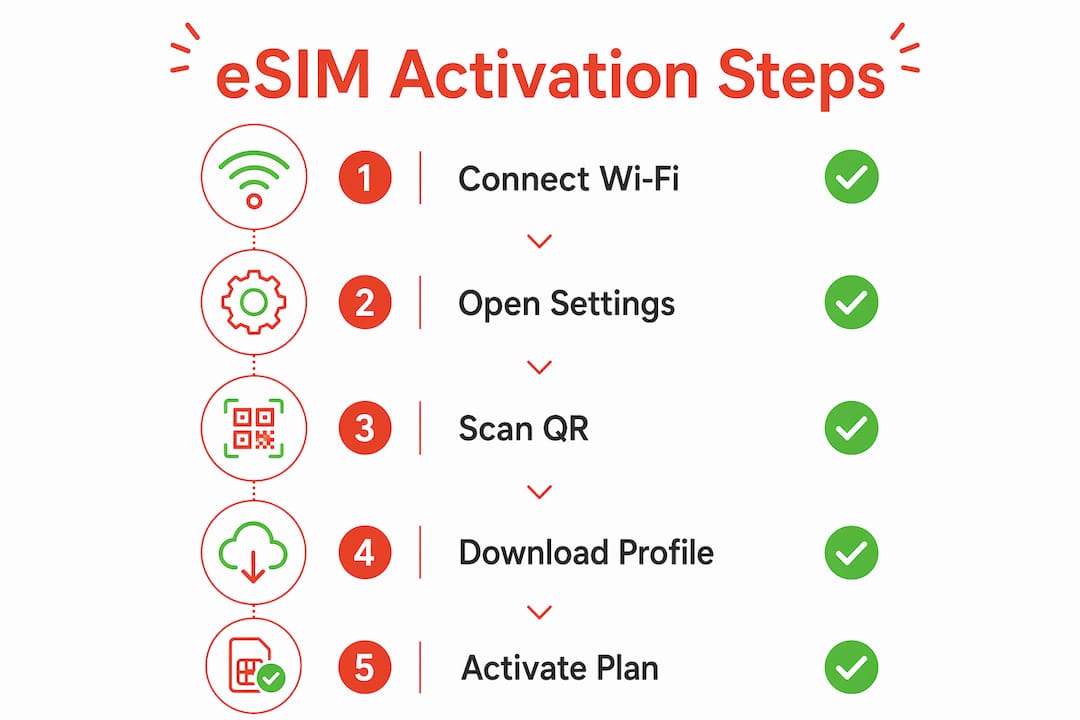
Apple documents five activation methods for iPhone eSIM setup, and the one you use depends on what your carrier provides. Here are the options in order of simplicity:
- Carrier activation. Some carriers assign your eSIM automatically when you purchase a plan. Your iPhone detects this and prompts you to install the profile during setup. No QR code needed.
- QR code scan. Go to Settings > Mobile Data > Add eSIM > Use QR Code. Point your camera at the QR code your carrier sent you. Confirm the installation when prompted.
- Carrier app. Download your carrier’s official app, follow the in-app prompts, and the app hands the installation over to iOS automatically. Carrier apps trigger an OS-level download, so you don’t need to touch Settings manually.
- Manual entry. Go to Settings > Mobile Data > Add eSIM > Enter Details Manually. You’ll type in an SM-DP+ address and an activation code. This method works but leaves more room for typos.
- eSIM transfer. If you’re switching from another iPhone, you can transfer your existing eSIM directly between devices without contacting your carrier.
Before you start, your iPhone needs a Wi-Fi or hotspot connection and must be running the latest version of iOS. Both conditions are non-negotiable for a successful install.
Pro Tip: If you’re activating a travel eSIM before your flight, do it at home on your own Wi-Fi. Airport networks can be unreliable and slow the process down.
Activating an eSIM on Samsung Galaxy
Samsung Galaxy devices offer three activation paths through Settings > Connections > SIM manager:
- eSIM Simple Setup. Samsung’s own feature detects compatible carrier plans and walks you through activation automatically.
- QR code scan. Select “Add eSIM” and scan the QR code from your carrier.
- Manual activation code. Enter the code your carrier provides if no QR code is available.
The navigation labels vary slightly between Android versions, but the path through SIM manager is consistent across the Galaxy S and A series.
What are the common troubleshooting steps if eSIM activation fails?
Most activation failures have nothing to do with the QR code itself. Apple identifies the majority of “activation failed” cases as environmental issues at the OS or network level. That’s actually good news because it means the fix is usually straightforward.
Work through these steps before contacting your carrier:
- Check your internet connection. eSIM activation requires a stable Wi-Fi or hotspot connection. Mobile data from another SIM works too, but a weak signal will stall the download.
- Update your operating system. An outdated iOS or Android version is one of the most common causes of failed installs. Check for updates in Settings before trying again.
- Toggle Aeroplane Mode. Turn Aeroplane Mode on, wait 30 seconds, then turn it off. This resets your network connections and often clears temporary errors.
- Restart your device. A full restart clears cached errors that can block the activation process.
- Check carrier settings. On iPhone, go to Settings > General > About. If a carrier settings update is available, install it before retrying.
- Verify your plan is active. Some carriers require you to confirm your purchase via email or SMS before the eSIM profile becomes available for download.
If you see the error message “Unable to Add eSIM,” the cause is almost always one of the above. You can also visit the Esim4u guide on iPhone activation errors for device-specific solutions.
Pro Tip: QR codes for eSIM activation are typically single-use. If you scanned yours and the activation failed, do not scan it again. Contact your carrier for a fresh code before attempting another install.
How does eSIM activation differ internationally?
The core eSIM activation steps are the same worldwide, but carrier policies, fees, and device requirements vary significantly by country. Knowing this before you travel saves you time and frustration.
Checking device compatibility
Before purchasing any eSIM plan, dial *#06# on your device. This displays your EID (Embedded Identity Document number), which confirms your device has an eSIM chip. If no EID appears, your device does not support eSIM. This check takes ten seconds and is worth doing before you spend money on a plan.
Carrier policies vary by country
Safaricom in Kenya is a clear example of how local carrier requirements can differ from what travellers expect. To swap a physical SIM for an eSIM, Safaricom customers must visit a physical shop, pay a fee, and scan a QR code in person. Roaming users may also require email-based approval before activation is granted. This is very different from the instant, app-based activation that travellers from Australia or the UK are used to.
The table below shows how activation requirements can differ across common travel scenarios:
| Scenario | Activation method | Key requirement |
|---|---|---|
| Domestic plan (Australia) | Carrier app or QR code | Wi-Fi connection, updated OS |
| International travel eSIM | QR code or carrier link | Compatible unlocked device |
| Local SIM swap (e.g. Kenya) | In-person QR code at shop | Fee payment, EID verification |
| Roaming activation | Email approval plus QR code | Carrier vetting process |
Dual SIM advantages for travellers and expats
Most modern iPhones and Samsung Galaxy devices support dual SIM functionality, meaning you can run a local eSIM alongside your home country’s physical SIM. This lets you keep your home number active for calls and messages while using a local data plan at local rates. For expats managing two countries, this is one of the most practical benefits of eSIM technology.
What methods do carriers offer for eSIM activation?
Carriers have expanded their activation options considerably, and the method you use affects both convenience and security.
- Carrier links. Some carriers send a direct activation link via SMS or email. Tapping the link on your device opens the eSIM installation prompt automatically. This is fast and requires no QR code scanning.
- QR codes. The most widely used method. Your carrier emails or displays a QR code, and you scan it through your device’s SIM settings. Simple and reliable when your internet connection is stable.
- Carrier apps. Apps from major carriers guide you through the process step by step. The app hands over the actual installation to iOS or Android, so the process is clean and less prone to user error.
- Manual entry. You receive an SM-DP+ server address and an activation code, then type both into your device settings. This method works on any compatible device but is the most error-prone due to long alphanumeric strings.
- Carrier preassignment. Some carriers assign an eSIM automatically at the point of purchase. Your device receives a notification prompting you to install the profile, with no QR code or manual steps required. This is the most frictionless option available.
Carriers typically notify you that your eSIM is ready via email or push notification. If you don’t receive a notification within a few minutes of purchase, check your spam folder before assuming something went wrong. For a full walkthrough of Android eSIM setup, Esim4u has a dedicated guide covering QR code and manual methods across popular Android devices.
Key takeaways
eSIM activation works by downloading a carrier’s digital profile onto your device via QR code, carrier app, manual entry, or automatic carrier assignment, and most failures are caused by network or OS issues rather than user error.
| Point | Details |
|---|---|
| Four activation methods | QR code, carrier app, manual entry, and carrier preassignment all install the same digital profile. |
| Device prerequisites | A stable Wi-Fi connection and the latest OS version are required before activation begins. |
| International variation | Carrier policies differ by country; some require in-person visits or fees, as with Safaricom in Kenya. |
| QR codes are single-use | A failed scan invalidates the code. Contact your carrier for a new one before retrying. |
| Dual SIM for travellers | Running a local eSIM alongside your home SIM keeps both numbers active without carrying two phones. |
What I’ve learnt from activating eSIMs across multiple countries
The single biggest mistake I see travellers make is blaming the QR code when activation fails. In almost every case I’ve encountered, the real culprit is a weak Wi-Fi signal or an OS that hasn’t been updated in months. Apple’s own support documentation backs this up, and once you know it, troubleshooting becomes far less stressful.
My second observation is that people underestimate how much carrier policy varies internationally. Activating a travel eSIM in Australia takes about three minutes on your couch. Doing the same thing in certain African or Asian markets might require a shop visit, a fee, and a waiting period. Researching your destination carrier before you leave is not optional if you want connectivity from the moment you land.
One thing I always recommend: keep your physical SIM active until you’ve confirmed the eSIM is working and you can make a call or load a webpage. Switching too early leaves you without a fallback if something goes wrong during activation. It costs nothing to wait five minutes and verify.
Finally, manage your eSIM profiles actively. Most devices let you store multiple eSIM profiles and switch between them in settings. If you travel frequently, label each profile clearly by country or carrier so you’re not guessing which plan is active when you land somewhere new.
— Peter
Get connected faster with Esim4u
Esim4u makes the eSIM activation process straightforward for travellers and expats on both Apple and Android devices. You get affordable international eSIM plans with transparent pricing and no physical SIM swaps required. Every purchase comes with a clear activation guide matched to your device. If you’re on an iPhone, the iOS installation guide walks you through every step from QR code scan to your first connected call. Need help with an Android device? The Android setup guide covers QR code and manual activation across all major brands. Esim4u’s support team is also on hand if anything goes wrong.
FAQ
What is eSIM activation?
eSIM activation is the process of downloading and installing a carrier’s digital SIM profile onto your device’s embedded chip, enabling cellular service without a physical SIM card.
How do you activate an eSIM using a QR code?
Go to your device’s SIM or Mobile Data settings, select “Add eSIM,” choose the QR code option, and scan the code your carrier provided. Your device will download and install the profile automatically.
Why does eSIM activation fail?
Most activation failures are caused by a poor internet connection or an outdated operating system, not a faulty QR code. Update your OS, connect to stable Wi-Fi, and retry before contacting your carrier.
Can you use two eSIMs at the same time?
Most modern iPhones and Samsung Galaxy devices support dual SIM, letting you run a local eSIM and your home SIM simultaneously. This is particularly useful for expats who need to keep a home number active.
What is eSIM cold activation?
eSIM cold activation refers to activating an eSIM profile on a device that has no active cellular connection at all, relying entirely on Wi-Fi or a hotspot to complete the download. It is the standard scenario for travellers purchasing a plan before arriving in a new country.
Recommended
- Buy An International eSIM Online for Travel | Global eSIM Cards with Affordable Prepaid Plans | eSIM4u
- eSIM Installation on Apple Devices | iPhone Setup for Travelers | eSIM4u – esim4u
- Error “Unable to Activate eSIM” on iPhone – esim4u
- eSIM Installation on Android Device | Setup with Activation and APN | eSIM4u – esim4u
Related Blogs
Explore the World Without Roaming Worries



100% Money Back Guarantee
If you cancel your trip or experience tech issues that we can’t fix; we’ll refund you 100%.